


PER9 Sport Watch Face Mesa
4.3108.00 Reviews
App Specs
- Version
- Varies with Device
- Updated On
- License
- Free
- Downloads
- 100,000+
- Developer
- PERSONA Watch Face
- Categories
- Personalization
- Platform
- Android
Screenshots
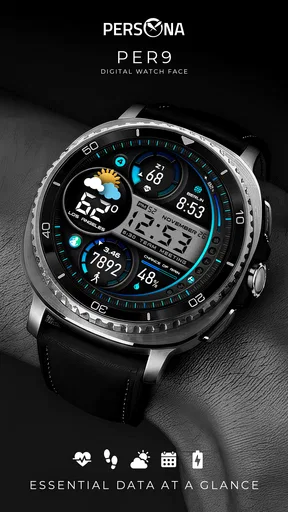
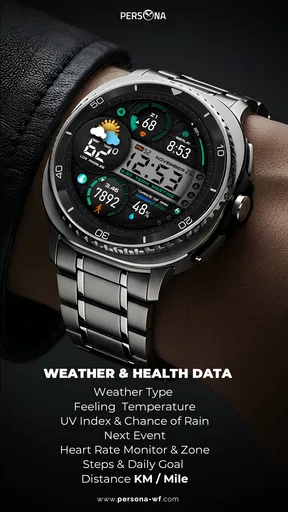
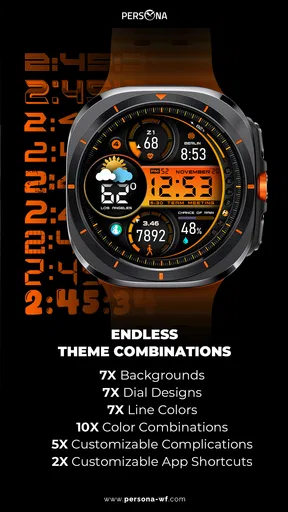
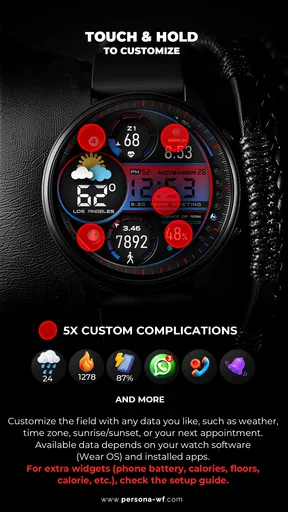
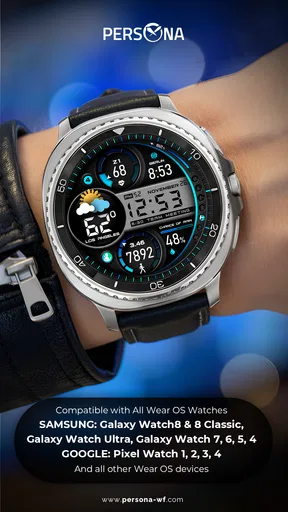
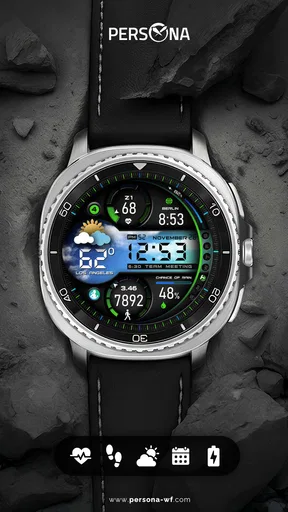
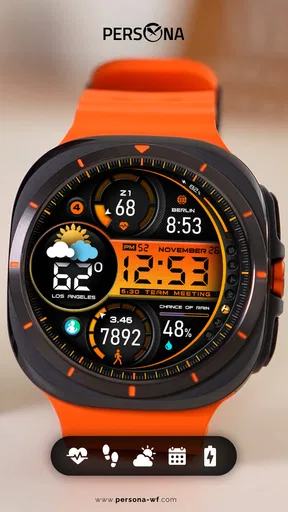
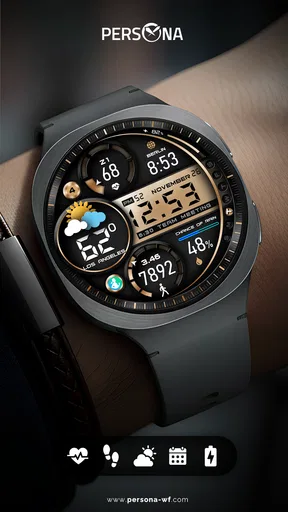
 Analysis by AppCompare
I spent time with PER9 Sport Watch Face Mesa as a daily Wear OS personalization app, and my main impression is clear: it is aimed at people who want their watch to look like a compact sports instrument rather than a miniature phone screen. The design puts a digital, information-focused face on the wrist, with a visual character that feels more purposeful than a basic clock while staying easy to read at a glance.
That focus is also the reason I would not recommend it to everyone. If you prefer a soft, traditional watch style, a highly decorative face, or an interface built around unusual complications and deep customization, this may feel too narrowly designed. But if your priority is a sporty appearance that makes the watch feel more active and modern, this face makes a convincing case for itself.
What the Mesa design gets right on a Wear OS watch
The strongest part of my experience was the face’s sense of identity. Many digital watch faces blur together: large numerals, a few small data areas, and a background that could belong to almost any theme. Mesa feels more deliberate. Its presentation is built around the idea of a sport-oriented dashboard, so the watch looks ready for a walk, a commute, or a gym session even when I am simply checking the time.
That matters because a watch face is not just a decorative wallpaper. I look at it dozens of times without consciously deciding to open an app. A good face should make the first glance useful, and this one is designed around that habit. The digital layout gives the time an immediate presence, while the surrounding visual treatment adds personality without turning the display into visual noise.
In my experience, the best use for this face is on a watch worn throughout the day. It suits casual clothing, exercise gear, and everyday workwear better than a formal analog face would. The sporty styling is noticeable, but it does not require the rest of an outfit to match. That makes it more versatile than a very aggressive racing or military-themed design.
The developer, PERSONA Watch Face, has positioned this as a Personalization app rather than a standalone fitness tool, and that distinction is important. I would not install it expecting training plans, workout coaching, or a replacement for a health platform. Its job is to change the visual experience of the watch, and it stays centered on that job.
Readable first, decorative second
What I appreciate most is the balance between visual style and practical reading. A watch face can look impressive in a store preview and become tiring after a few hours because the numerals are crowded or the contrast is weak. Mesa’s digital approach avoids the basic problem of trying to interpret ornate hands or small markers while moving.
Worth Reading Before You Choose

EA SPORTS FC Mobile 26 Is a Bigger Football Game, but It Takes Time

Flipboard Shows What News Apps Must Do Beyond the Feed

Switching to Android Auto Means Rethinking Your Driving Routine

Google Calendar Makes a Crowded Week Easier to Manage

Ludo King Makes the Most of the Minutes Between Plans

Baby Panda World Brings Quick Play to Modern Phones, but Its Game Library Feels Busy
This is especially useful in ordinary situations: checking the time while carrying groceries, glancing down during a meeting, or looking at the watch in the middle of a walk. I do not have to pause and study the design. The face presents itself as information first, which is exactly what I want from a wearable display.
There is a subtle trade-off here. A strong visual identity can make a face less neutral. Mesa is not the kind of design I would choose when I want my watch to disappear into the background. It announces itself more than a plain digital face does. For some users that is the appeal; for others, it may feel like too much style for a device they want to keep understated.
How I would use it during a normal day
My most realistic scenario for Mesa is a day when the watch has to move between several roles. In the morning, I can glance at it while getting ready without opening another screen. During a commute, the sporty layout gives the watch a more active look than the default face. At work, the digital presentation remains quick to read. Later, during an evening walk, the same design still feels appropriate instead of looking overly formal.
That continuity is one of its practical strengths. I do not need to change the face every time my activity changes. A dedicated running face might be better for someone who wants a training-specific display, while a classic face might suit a formal event more naturally. Mesa sits in the middle: active enough for everyday movement, but general enough for normal wear.
A useful tip is to judge it after wearing it for a full day rather than relying only on the installation preview. Watch faces are experienced in motion, in changing light, and at different angles. The question is not only whether the design looks attractive in a screenshot; it is whether I can read it instantly when I am distracted. Mesa works best when the wearer values that quick, habitual glance.
Where it stands against ordinary alternatives
Compared with the default digital faces included with many Wear OS watches, Mesa feels more considered and less generic. A stock face is often the safest choice because it blends into the system and usually offers familiar controls. Mesa’s advantage is character: it gives the watch a stronger visual direction without requiring a new device.
Compared with minimalist digital faces, the choice is less straightforward. A minimalist face may be better if I want only the time and a nearly empty screen. Mesa is for someone who wants the watch to look like a designed object, not merely a blank display with numbers placed on it. The extra visual treatment adds energy, but it also means the face is not the most discreet option.
Compared with elaborate complication-heavy faces, Mesa is appealing for the opposite reason. Some alternatives try to show everything at once, which can be useful for users who constantly monitor several details. The cost is often clutter and a longer reading time. Mesa’s sporty dashboard idea feels more controlled, so I would choose it when quick recognition matters more than maximum information density.
There is also a difference between a face that looks sporty and one that is genuinely built for serious training. Mesa belongs in the first group. It can support the atmosphere of an active lifestyle, but I would still use a dedicated workout screen when I need detailed exercise information. That is not a flaw in a personalization app; it is simply the right boundary for what this product is meant to do.
The small decisions that improve the experience
One non-obvious benefit of choosing a themed face like this is consistency. When the visual language of the watch matches the way I use it, the device feels less like a collection of disconnected screens. Mesa gives the watch a recognizable front door. Notifications, apps, and fitness tools may still come from different parts of Wear OS, but the face establishes a clear starting point.
Another practical consideration is attention. A face with a strong sports identity can encourage me to treat the watch as something active rather than purely decorative. I may be more inclined to glance at it during a walk or keep it on during errands. That does not make the face a fitness coach, but visual design can influence how often a device becomes part of a routine.
The third trade-off is longevity. A very fashionable face can become tiring if its style dominates every glance. Mesa’s digital foundation helps it avoid feeling like a novelty, but the sporty presentation remains central. I would rotate it with a quieter face if I wanted a different mood for formal occasions or extended periods of screen use. That is a sensible way to get more value from it rather than expecting one face to suit every context.
Installation, cost, and everyday expectations
The app is free, which makes experimenting with it straightforward. I can try the design without treating the decision like a major purchase, and that is particularly useful with watch faces because personal taste is difficult to predict from a screenshot. The free price also makes Mesa an easy option for someone who has just bought a Wear OS watch and wants a more distinctive look without immediately paying for customization.
It is intended for Everyone, so its appeal is broad from an age-rating perspective. The more important question is preference: will the wearer enjoy a sport-oriented digital face? A teenager, a commuter, or an adult who likes active styling can all find a reason to use it, while someone searching for a jewelry-like or traditional appearance will probably be happier elsewhere.
The app has been available since March 13, 2022, and its reception gives it a useful level of real-world visibility. It has passed 100 thousand installs and holds an average rating of 4.3 from around 2.4 thousand ratings. Those figures do not replace personal testing, but they suggest that the concept has found an audience beyond a handful of early adopters.
I would also keep expectations realistic about what installing a watch face changes. It refreshes the watch’s presentation; it does not transform the hardware, add new sensors, or turn the device into a dedicated sports computer. If the watch already feels slow, has a dim display, or lacks the information a user wants, a new face cannot solve those underlying limitations.
Who should choose Mesa, and who should skip it?
I think Mesa is a strong fit for Wear OS owners who want three things at once: a clear digital time display, a noticeable sports-inspired personality, and a free way to move away from the default watch face. It is especially suitable for people who wear their watch casually across the whole day instead of changing styles for every activity.
It also makes sense for someone who has tried ultra-minimal faces and found them dull, but does not want an overloaded dashboard. Mesa occupies that useful middle ground. It gives the watch more visual presence while keeping the central purpose obvious. If the phrase “sporty but usable” describes the look you want, this is the audience I would point toward first.
I would skip it if my priority were formal elegance. A classic analog face, a restrained digital design, or a face with a more luxurious visual language would fit a business event or dress watch better. I would also look elsewhere if I needed a face selected primarily for detailed training data. In that situation, a specialized fitness-oriented option would be the more sensible tool.
Users who enjoy changing every color, layout, and information field may also want to investigate more customization-focused alternatives before settling here. Mesa’s appeal comes from its finished design direction. That can be a benefit because it reduces decision fatigue, but it can feel limiting to someone who wants to build a face from the ground up.
For a first-time user, my advice is simple: install it when you want your watch to feel more active, then wear it through a normal routine rather than judging it only while sitting indoors. Check whether the time remains easy to read in the situations that matter to you. Notice whether the sporty styling still feels comfortable at work, at home, and outside. That test will tell you more than the download screen.
My final take after using it
PER9 Sport Watch Face Mesa succeeds because it understands that a watch face needs a clear point of view. It is not trying to be a complete fitness platform or an endlessly configurable design studio. Instead, it gives a Wear OS watch a sporty digital identity that is easy to recognize and practical enough for repeated daily use.
The limitations are tied to that same choice. Its visual character will not suit everyone, and it is not the best answer for formal styling, extreme minimalism, or serious training data. I would not install it expecting a new set of health features. I would install it because I wanted the watch itself to look more energetic and purposeful.
Overall, I recommend it to anyone who finds the standard Wear OS options bland and wants a free, sport-focused alternative without turning the display into a wall of information. PERSONA Watch Face has made a focused personalization app rather than an all-purpose utility, and that focus is what makes Mesa work. For the right wearer, it is a small change that gives the entire watch a more confident everyday personality.
Pros
- Clean sports-inspired design with quick access to essential watch data.
- Large
- readable numerals make the face easy to check during workouts.
- Multiple color options help match different straps and personal styles.
- Useful complications let you customize shortcuts and displayed information.
- Designed for Wear OS
- with a layout suited to round smartwatch screens.
Cons
- Some customization options may require the companion app or a paid version.
- Small complications can be difficult to read while moving or exercising.
- Compatibility may vary between Wear OS watches and screen resolutions.
- The sporty design may not suit formal outfits or users wanting a classic face.
- Battery impact can increase when using bright colors and frequently updated data.
FAQs for PER9 Sport Watch Face Mesa
What is PER9 Sport Watch Face Mesa?
PER9 Sport Watch Face Mesa is a sporty Wear OS watch face designed for users who want quick access to time, date, and fitness-related information directly from their smartwatch. Its layout focuses on a modern, athletic appearance with customizable elements, making it suitable for everyday wear, workouts, and outdoor activities. Availability and supported features may depend on the watch model and Wear OS version.
Which smartwatches are compatible with PER9 Sport Watch Face Mesa?
Before downloading, check that your device runs a compatible version of Wear OS, since this watch face is intended for Wear OS smartwatches rather than standard Android phones or iPhones. Compatibility can vary between Samsung Galaxy Watch, Google Pixel Watch, Fossil, TicWatch, and other models. Some complications or interactive features may also differ depending on the hardware and software installed.
Can I customize the PER9 Sport Watch Face Mesa design?
Customization is one of the main reasons to choose a digital sport watch face. Depending on your smartwatch and the version installed, PER9 Sport Watch Face Mesa may allow you to adjust colors, complications, display information, and other visual details through the watch face settings. Available options can vary, so review the store description and installation settings before expecting every feature on your particular device.
Does PER9 Sport Watch Face Mesa track fitness or health data by itself?
A watch face normally displays information supplied by the smartwatch and its connected health or fitness services; it is not necessarily a complete fitness-tracking application. PER9 Sport Watch Face Mesa may show items such as steps, heart rate, battery level, or other complications when supported by the watch. Accuracy depends on the sensors, permissions, and health apps configured on your device.
Is PER9 Sport Watch Face Mesa free to download and easy to install?
The price and installation method can depend on the marketplace, region, and promotional offers available when you access the listing. In most cases, you install the watch face through the compatible Wear OS app store and then select it from the watch face menu on your smartwatch. Make sure the watch is paired correctly and check any purchase requirements or in-app settings before downloading.


